> For the complete documentation index, see [llms.txt](https://hotro-hoadonbachkhoa.pmbk.vn/llms.txt). Markdown versions of documentation pages are available by appending `.md` to page URLs; this page is available as [Markdown](https://hotro-hoadonbachkhoa.pmbk.vn/4.-xu-ly-hoa-don/dieu-chinh-chung-hoa-don.md).
# Điều chỉnh chung hóa đơn
Tại đây cho phép điều chỉnh về tăng, giảm tiền và cả nội dung
* Nội dung của hóa đơn cần điều chỉnh có giá Sữa rửa mặt là 100.000 đồng, tiền thuế là 10.000 đồng, tổng tiền thanh toán là 110.000 đồng. Bột giặt omo giá là 40.000 đồng, tiền thuế là 4.000 đồng, tổng tiền thanh toán là 44.000 đồng.
* Nội dung đúng của hóa đơn là: giá sữa rửa mặt là 110.000 đồng, tiền thuế là 11.000 đồng, tổng tiền thanh toán là 121.000 đồng. Giá Bột giặt omo là 35.000 đồng, tiền thuế là 3.500 đồng, tổng thanh toán là 38.500 đồng.
\=> Vậy phải thực hiện điều chỉnh: Sữa rửa mặt là 50.000 đồng, tiền thuế là 5.000 đồng, tổng thanh toán là 11.000 đồng. Bột giặt omo là -5.000 đồng, tiền thuế là -500 đồng, tổng thanh toán là -5.500 đồng.
## 4.1.1 Lập biên bản điều chỉnh hóa đơn
* **Cách 1:**
* Truy cập vào giao diện phần mềm
* Chọn **Hóa đơn**/**Hóa đơn điện tử**
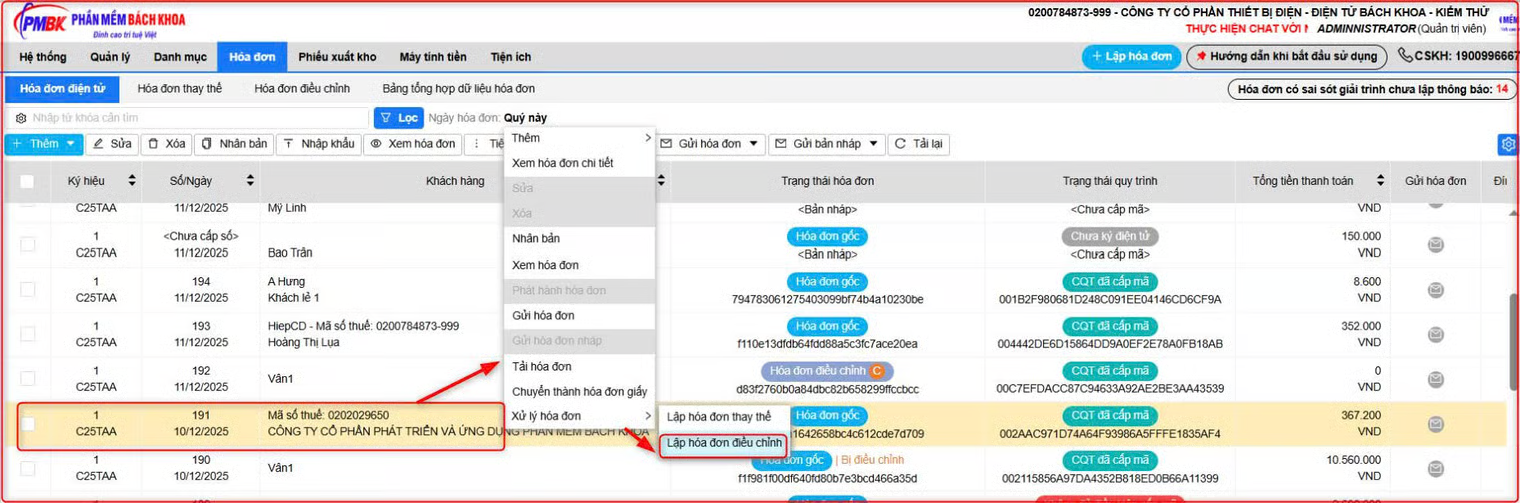
* Tích chuột phải vào hóa đơn cần điều chỉnh/ Chọn **Xử lý hóa đơn/ Lập hóa đơn điều chỉnh**
* **Cách 2:**
Người dùng chọn: **Hóa đơn > Hóa đơn điều chỉnh > Lập hóa đơn điều chỉnh**
* Với hóa đơn máy tính tiền: Truy cập **Máy tính tiền/Hóa đơn điện tử/ Hóa đơn điều chỉnh/Lập hóa đơn điều chỉnh**
* Phần mềm cảnh báo khuyến nghi, người dùng chọn **Tiếp tục**
* Chọn kỳ hóa đơn, số hóa đơn cần điều chỉnh => Chọn Lấy dữ liệu => Tích chọn hóa đơn cần điều chỉnh => Chọn Đồng ý

* Người dùng chọn **Lập biên bản điều chỉnh**
* Điền các thông tin phù hợp **> Lưu > Ký điện tử**

* Người dùng chọn **Gửi biên bản điều chỉnh**
* Người dùng nhập **Tên người nhận/ Email , chọn Thực hiện**
* Biên bản gửi thành công, người dùng bấm **Đóng**
⇒ Báo bên người mua check email để thực hiện ký biên bản điều chỉnh ⇒ chọn Đóng
* Thực hiện điều chỉnh hóa đơn
(1) Tích chọn **Điều chỉnh chung**
(2) Điền **lý do điều chỉnh hóa đơn**
(3) Tích chọn nếu muốn **hiển thị** lý do điều chỉnh trên hóa đơn
(4) Điền thông tin điều chỉnh trên hóa đơn
(5) Chọn **Lưu**
* Có thể thực hiện **Xem hóa đơn**  trước khi thực hiện phát hành
* Chọn **phát hành** hóa đơn => Chọn **Thực hiện**
* Lưu ý: với hóa đơn MTT thêm bước 4: Chọn gửi CQT
Lưu ý: Lưu ý: Hóa đơn điều chỉnh không cần gửi tờ khai 04
{% content-ref url="/pages/R6nwFuafSsDgrXE7XkII" %}
[Điều chỉnh tăng](/4.-xu-ly-hoa-don/dieu-chinh-tang.md)
{% endcontent-ref %}
{% content-ref url="/pages/uqvpMvKUaWhHboybuH6S" %}
[Điều chỉnh giảm](/4.-xu-ly-hoa-don/dieu-chinh-giam.md)
{% endcontent-ref %}
{% content-ref url="/pages/xcxWjNwtMjEmStywfxZR" %}
[Điều chỉnh nội dung](/4.-xu-ly-hoa-don/dieu-chinh-noi-dung.md)
{% endcontent-ref %}